For everyone on the stage and behind the mics
Stage, seating, mic and camera plans for any ensemble
As simple as you need, as detailed as you want. Lay out an orchestra, a choir or a band in minutes, or plan every chair, mic and cable for a whole concert. It runs in the browser on a computer, iPad or phone.

Simple to start, as detailed as you need
Where would you like to start?
Drag performers on and send it, or drop a few mics and count channels. Each path then goes further, one step at a time.
 Stage & concertsFor conductors, music directors, choir directors, stage and orchestra managers, band leaders, school music directors and venue crews.Seating, risers and stage plans, up to a whole concert with changeovers.See how it works →
 Sound & videoFor recording and live sound engineers, producers, videographers, broadcast and streaming teams, and A/V technicians.Mics, channels and cameras, up to a full plan built from the mics you own.See how it works →
For conductors, music directors, choir directors, stage and orchestra managers, band leaders, school music directors and venue crews
Stage & concerts
Five minutes
Pick the ensemble, send the link
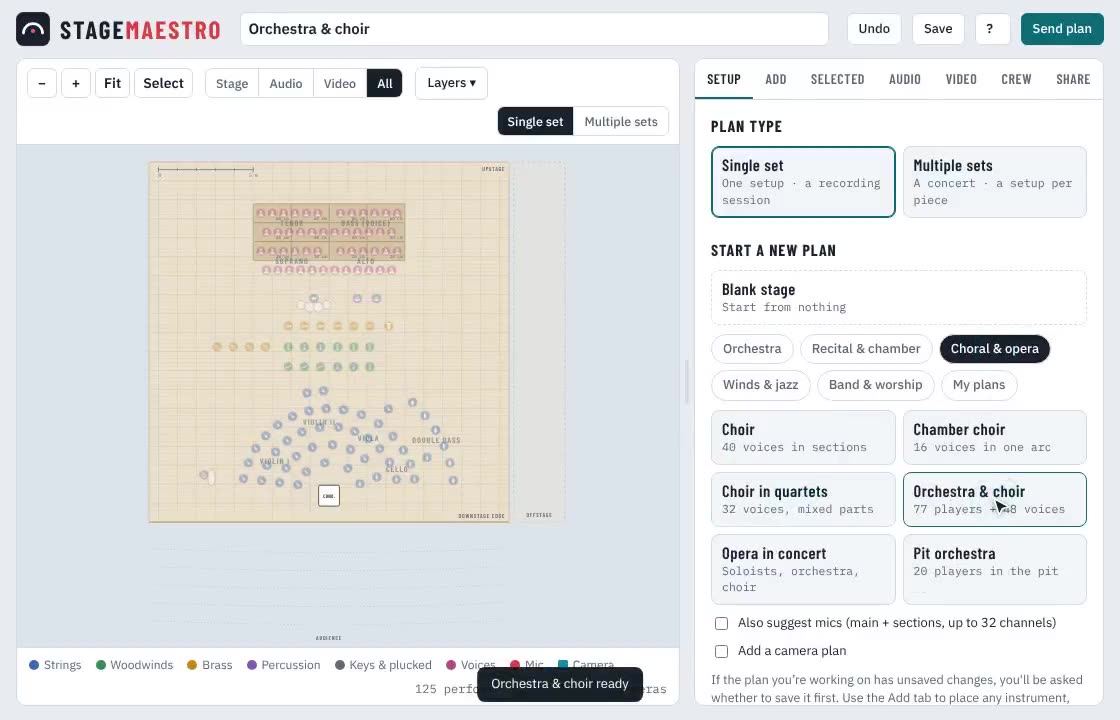
Choose from more than twenty-five ensembles, from string quartet and choir to full symphony, opera, big band or worship band. Everyone appears in their usual seats, with music stands and the podium. Press Send plan and text the link to your stage manager: no drawing program, no PDF to redo.
Or build your own orchestra by count, in American or antiphonal seating.
That’s all many people need. The rest is there when you want it.
A little more
Make it your orchestra
Add anyone and drag them where you want them: harps, pianos and timpani are drawn to their real size, so you can see whether it all fits. Add risers, put players’ names on their seats and mark the soloist.
Set the stage to your hall’s real width and depth in Setup → Stage. The Crew tab counts chairs, stools, music stands and risers for the stagehands.
In detail
A set for each piece
Overture, concerto, symphony: switch to Multiple sets and give every piece of the concert its own seating. Each set starts as a copy of the one before, so you only change what's different: brass off, piano on, horns moved over.
The full picture
Changeovers and the concert PDF
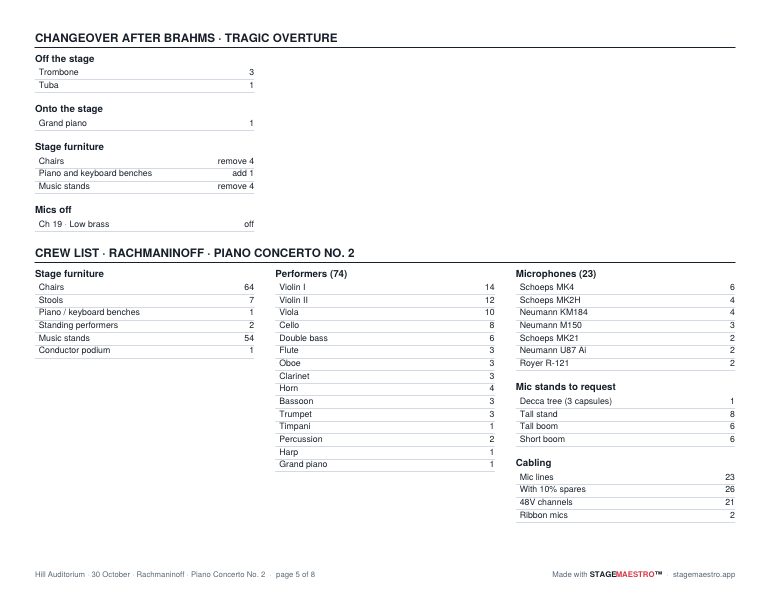
Changeover shows what comes off, what goes on and what moves between pieces, with a list for the stagehands.
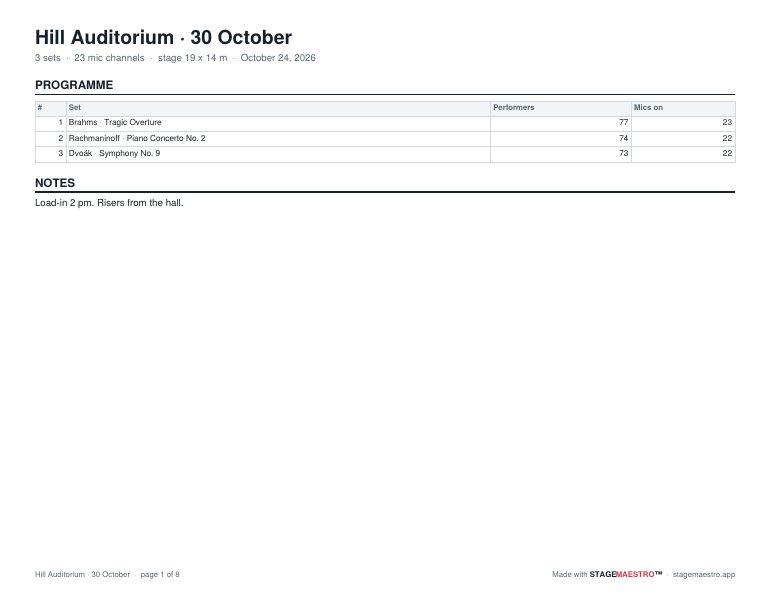
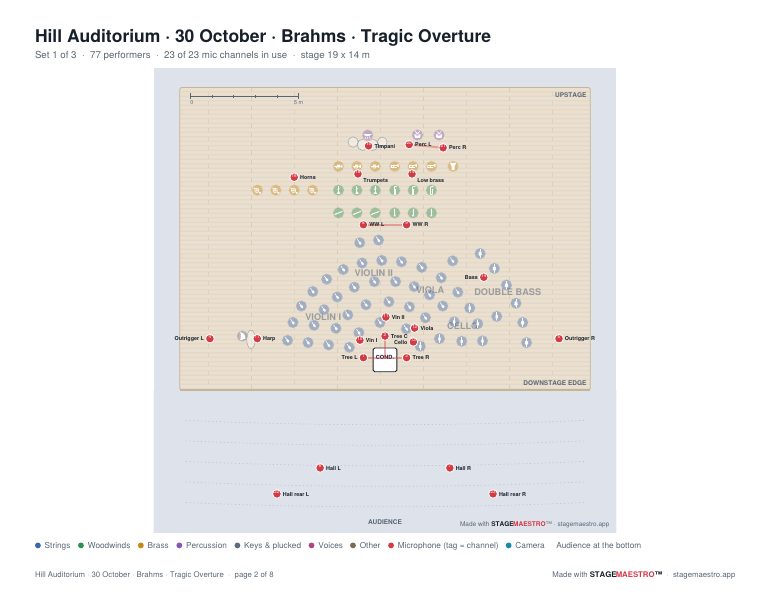
One PDF holds the whole evening: a program page, then each set's plan and crew page.
 Click to enlarge
 Click to enlarge
 Click to enlarge
Working with an engineer or video crew? See Sound & video →
For recording and live sound engineers, producers, videographers, broadcast and streaming teams, and A/V technicians
Sound & video
Five minutes
Place a few mics, count the channels
Drop a main pair in front of the stage and a spot or two where you need them. StageMaestro numbers the channels and builds the input list as you go, ready to paste into Excel, Numbers or Google Sheets.
That’s all many people need. The rest is there when you want it.
A little more
Suggest the whole mic plan
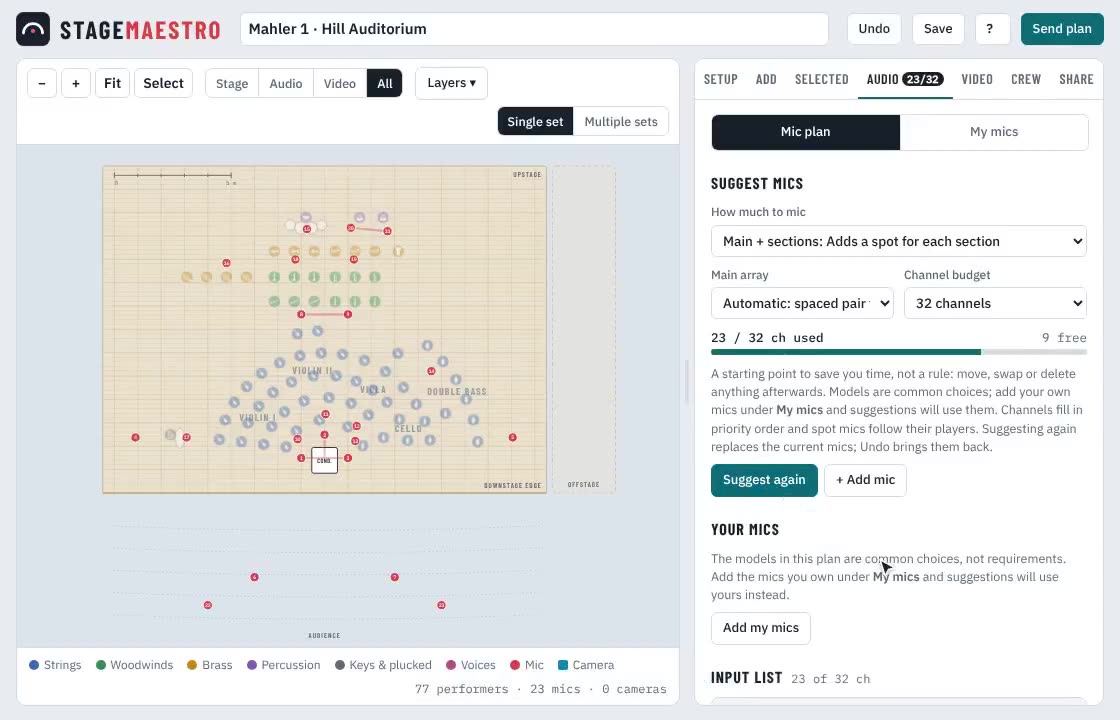
Choose how much to mic, from a main pair to a spot on every desk, and set your channel count. StageMaestro places the main array (Decca tree, spaced pair, ORTF, or a Dolby Atmos 5.1.4 or 7.1.4 tree), outriggers, hall mics and spots.
Spot mics follow their players: rearrange the woodwinds and their mics go with them.
It’s only a starting point, to save you time. Move, delete or add mics as you wish.
In detail
Fine-tune every mic
Set each mic's model, pickup pattern, stand, height, aim and 48V, and see its pattern drawn on the stage, so you can tell what an omni, cardioid or figure-8 will hear.
In a concert, mics keep their channel numbers all night and can move between sets or stay fixed.
The full picture
Your mic locker
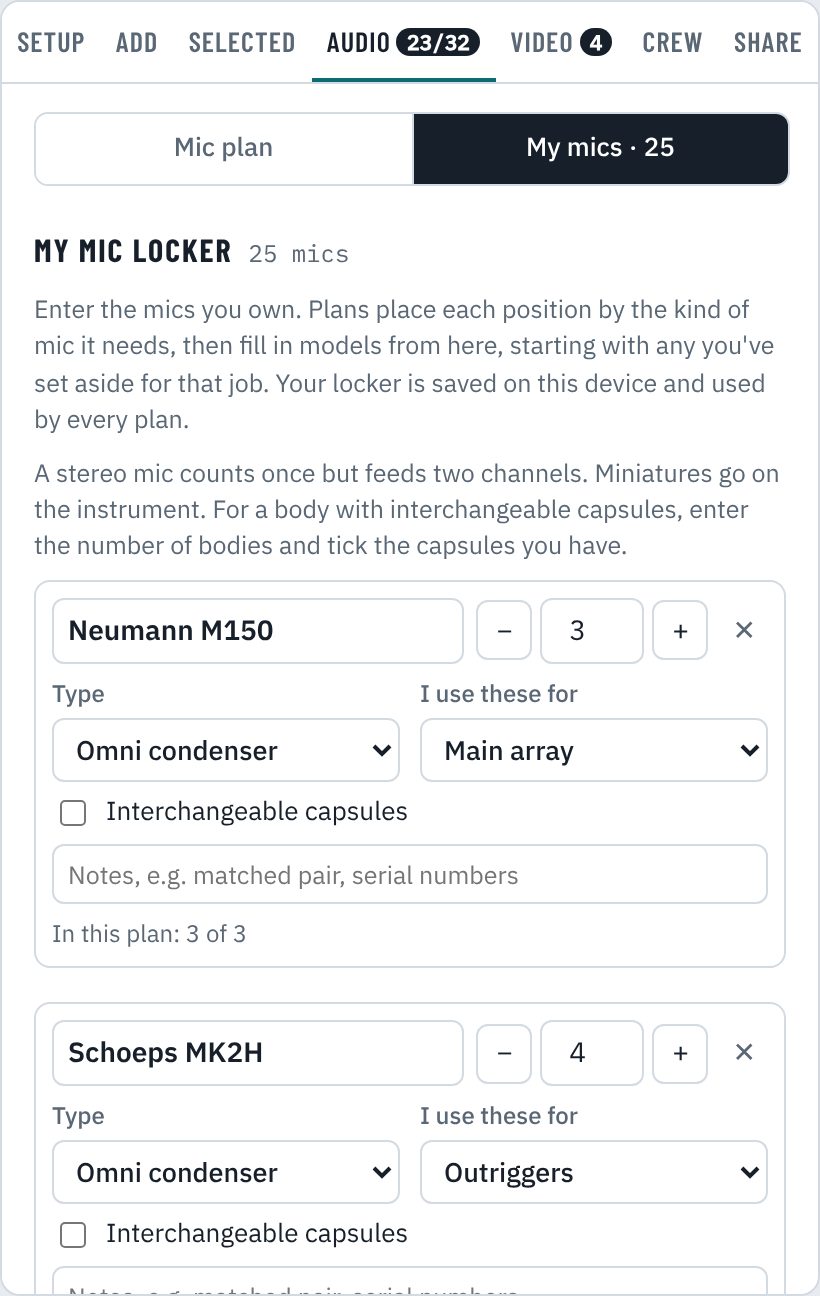
Enter the mics you own once, with how many of each and what you use them for: main array, outriggers, strings, brass. Every suggested plan then uses your mics, keeps matched pairs together and tells you when you’re short.
The crew list counts stands and cables, adds 10% spares and totals the 48V channels, so the van gets packed right.
 Click to enlarge
For video
Cameras in the same plan
For a filmed or streamed concert: a wide shot from the hall, one on the conductor, PTZs either side and a handheld.
Widen or tighten each camera's field of view and swing it to its shot, and see exactly what it covers on stage. Lens, height and notes go in the camera list.
Planning the seating as well? See Stage & concerts →
Where the two meet
One plan, everyone on it
Conductor, stage manager, engineer and video crew work from the same plan, and pass it back and forth with a link.
Send it with one link
Send plan makes a link that opens a copy of your plan, ready to email or text. The whole plan travels inside the link: nothing is uploaded, and the other person's changes never touch yours.
Or download a PDF, print it, or save the drawing and input list as files.
Ask the conductor for the seating
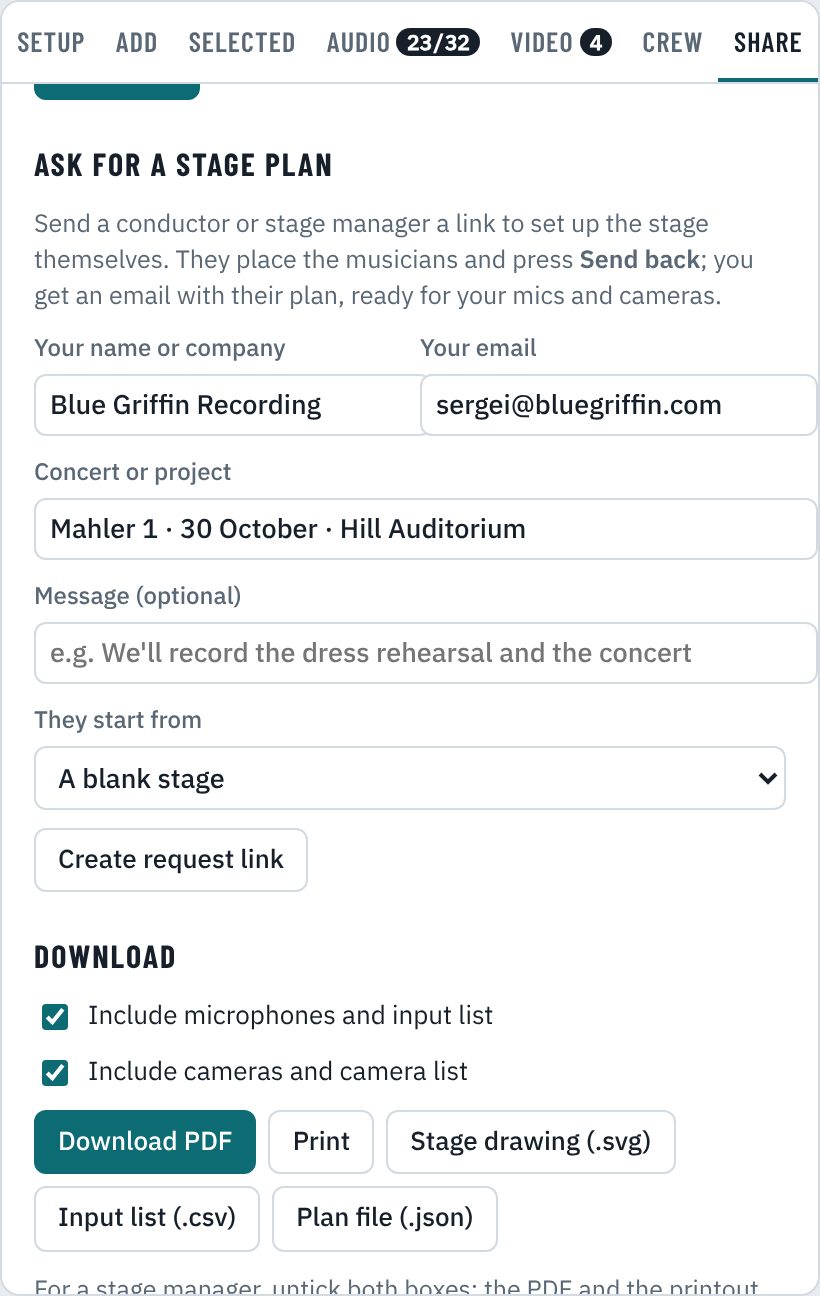
Engineers: send the conductor or stage manager a request link. They lay out the stage the way they want it and press Send back, and their plan comes back to you by email, ready for your mics.
No account or app on their side: the link opens in their browser.
 Click to enlarge
One crew list for everyone
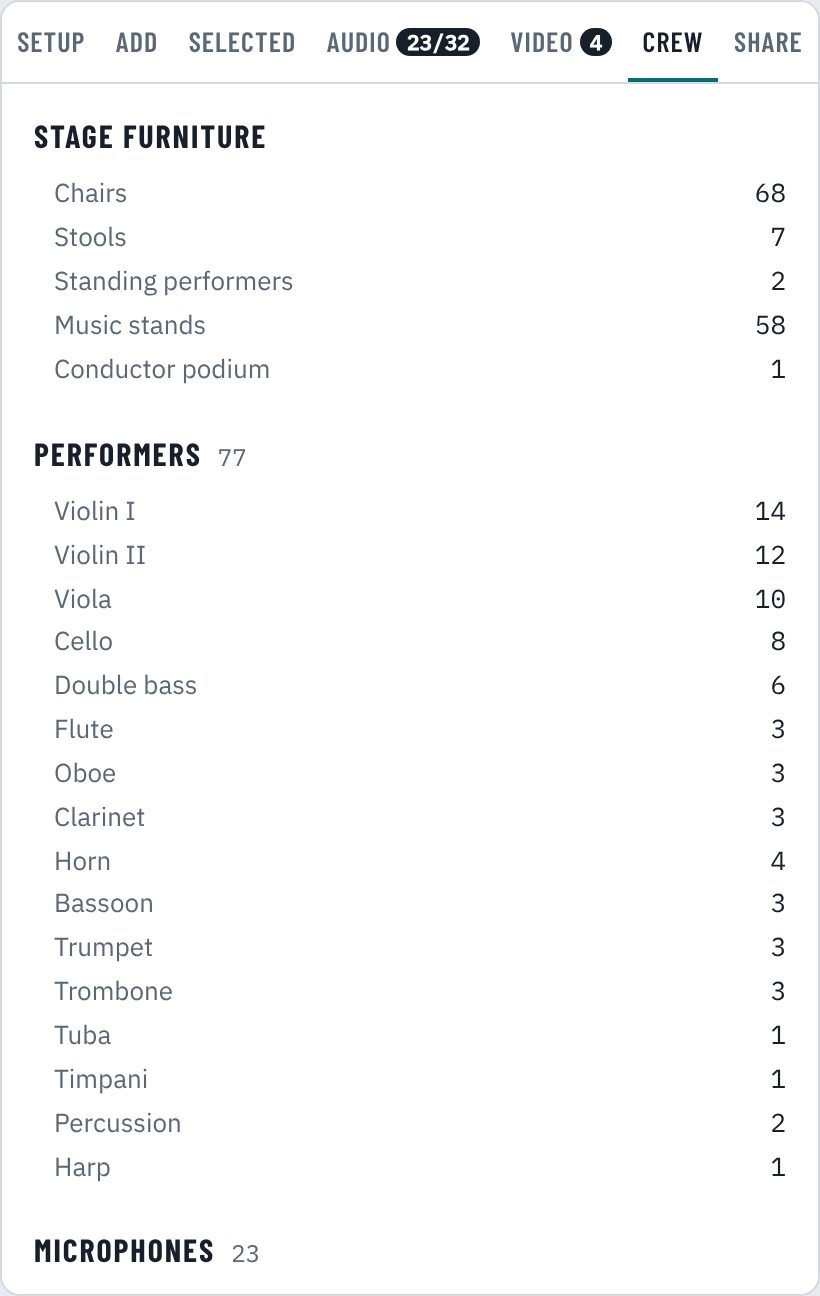
Chairs, stools, stands, risers and the podium for the stagehands; mics, stands, cables, spares and 48V for the audio team. Untick mics and cameras for a stage-manager-only PDF.
 Click to enlarge
And many more features
Immersive arrays
Dolby Atmos 5.1.4 and 7.1.4 trees, height pairs, Decca tree, ORTF and spaced pairs, each placed as one rig.
Choirs, opera and pits
Choir, chamber choir, choir in quartets, orchestra with choir, opera in concert and a pit orchestra, ready to start from.
Bands and worship
Monitor wedges, DI boxes, stage boxes, power drops and vocal mics for rock, pop, jazz and worship sets.
Names on the plan
Label seats by number or by player's name, mark the soloist, and add text labels anywhere on stage.
Your stage, your size
Set the stage width and depth to match your hall, church or studio, or press Fit to plan to wrap the stage around your players. It’s in Setup → Stage.
Risers, counted
Risers by size and height, drawn to scale and added to the crew list automatically.
Custom orchestras
Build any orchestra by count, in American or antiphonal seating, with music stands one per string desk.
Every export
PDF and print, the stage drawing as an SVG, the input list as a spreadsheet, and a plan file to archive or send.
Layers
Show performers, mics or cameras alone, with or without the 1 m grid, stands and section names.
Works offline
Once opened it keeps working without a connection. On iPad or iPhone, add it to the home screen and it opens like an app.
Fast on iPad and desktop
Drag, pinch to zoom, box-select with a finger, nudge with the arrow keys, duplicate, and undo anything.
Notes for the crew
Load-in times, contacts, who to ask for the risers: write it once in Setup and it prints with the plan.
Coming next
Ask StageMaestro Coming soon
Type “how do I…?” in Help and get the answer in plain words, with the tabs and buttons to press, straight from the manual.
Your plans everywhere Planned
An account that keeps your plans and mic locker in sync on your computer, iPad and phone.
Recording sessions Planned
Export the input list as an AAF session: one named, panned track per mic, ready to open in Pro Tools or Pyramix.
Console scenes Planned
A scene file with your channel names, colors and 48V, loaded into a Behringer X32 or Midas M32 from a USB stick. More desks to follow.
Questions
Good to know
Do I need to install anything?
No. StageMaestro runs in the browser on a computer, iPad or phone. On iPad and iPhone you can add it to your home screen from Safari's Share menu so it opens like an app.
How do I get in?
StageMaestro is in invitation-only testing. Enter your email below (or in the app) and an invitation arrives within a minute. There's no password: the link in the email signs you in, and it works on each of your devices. People who open a plan or request you sent them go straight in without one.
Where do I send comments?
Reply to your invitation email, or use Send feedback in the app's Help (?) menu. Feedback can include the plan you have open, so we see exactly what you see.
Where are my plans saved?
For now, while StageMaestro is in testing, plans are saved in your browser on your device. Press Save to keep a plan in My plans; after that, changes save themselves. To move a plan to another device, send it to yourself with Send plan. Accounts that keep your plans and mic locker in sync across all your devices are planned for the full release.
Can people change a plan I send them?
They get their own copy. Their changes never touch yours, and they can send you a new link back.
Does it work for bands and worship teams too?
Yes. There are templates for rock and pop bands, voice and guitar duos, worship bands and jazz combos, with monitor wedges, stage boxes and power drops.
What do you collect?
The email you were invited with and simple usage counts, never your plans (unless you attach one to feedback). The details are on the privacy page.
Try it for your next concert or session
StageMaestro is in invitation-only testing. Enter your email and your invitation arrives within a minute. No password needed.